UX
UI
Construction Management Platform
End-to-end LGS construction management system
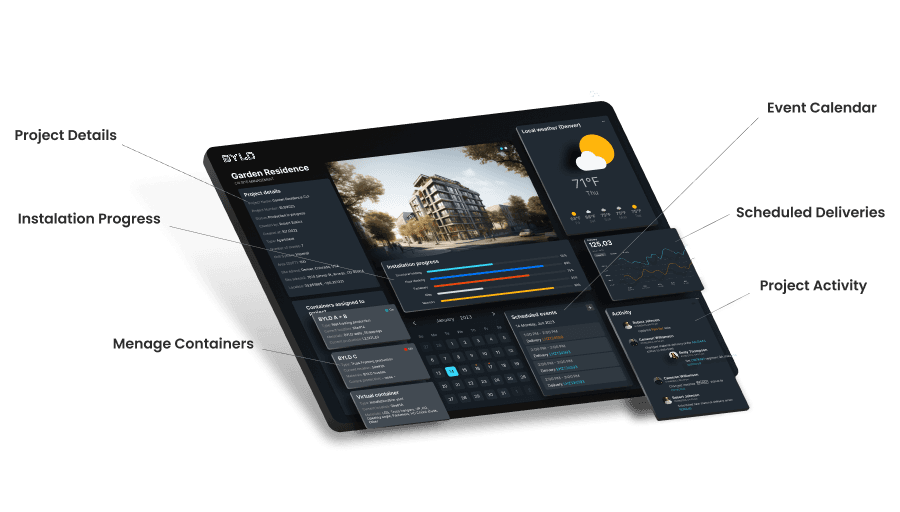
Overview
My role
Product Designer (UX/UI)
As a Product Designer, I worked end-to-end across the platform, closely embedded within a cross-functional team. My responsibilities included:
collaborating closely with stakeholders, Product Owner, Research & Development, engineers, and software developers throughout the entire product lifecycle,
co-creating product direction during discovery and planning phases,
preparing personas, user journeys, and participating in creative and ideation sessions to align business goals with real operational needs,
defining information architecture and overall system structure,
translating complex construction, logistics, and production processes into clear, usable UX patterns,
designing core workflows for procurement, delivery scheduling, inventory management, production planning, quality assurance, and installation tracking,
creating both low-fidelity and high-fidelity interactive prototypes to validate flows and support development,
continuously testing, reviewing, and iterating on solutions together with developers, incorporating technical constraints and real-world feedback.
This role required constant alignment between design intent, system constraints, and the realities of large-scale construction operations — balancing strategic thinking with hands-on execution.
The Challenge
As projects scaled, teams faced increasing difficulty in:
coordinating material purchases across multiple suppliers,
scheduling deliveries to match production and installation timelines,
maintaining reliable inventory visibility across sites and warehouses,
tracking production progress and QA status at a granular level,
aligning production output with real installation progress on-site.
These challenges were compounded by the fact that many processes were deeply interdependent — changes in one area (e.g. production delays or QA issues) had immediate downstream impact elsewhere.
Product & UX Strategy
1. Clear operational states
Every material, segment, and module has an explicit status that reflects its real position in the process.
Workflow-driven structure
Procurement, scheduling, inventory, production, QA, and installation are treated as connected stages, not isolated modules.
3. Progressive disclosure
High-level overviews are complemented by drill-downs into detailed data only when needed.
3. System consistency
Shared interaction patterns and terminology across modules reduce cognitive load and onboarding time.
Design Process
Research & System Understanding
The process started with deep system immersion. I worked closely with stakeholders, engineers, site managers, and logistics teams to understand how the platform will be used across different stages of construction and production.
Through interviews and workshops, we gathered insights into real workflows, constraints, and edge cases. These findings were synthesized into personas and user journeys, helping align business goals with the operational reality of construction, logistics, and manufacturing teams.
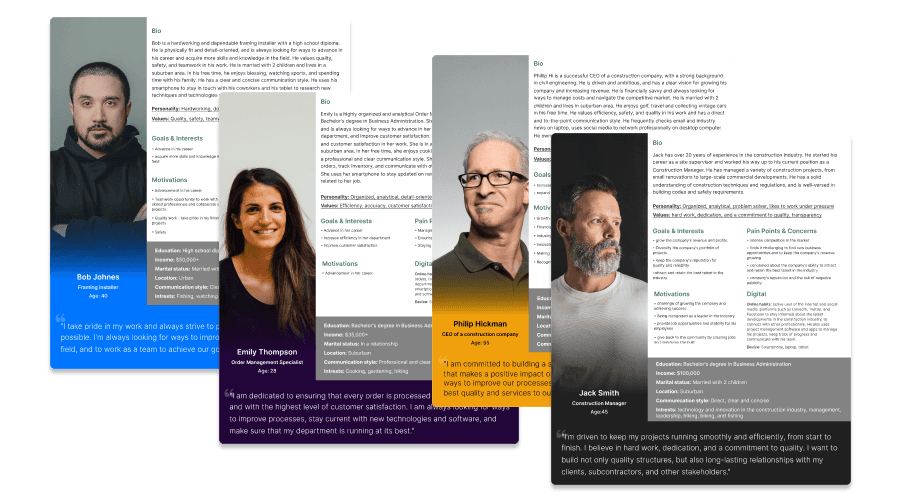
Multiple personas were created to reflect the diverse roles interacting with the platform.
Each persona represented a distinct branch of the system — from operations and logistics to production, QA, and site management — allowing us to design workflows tailored to real responsibilities, decision-making contexts, and levels of technical expertise.
This approach helped ensure the platform scaled across teams without forcing a one-size-fits-all interface.
Information Architecture
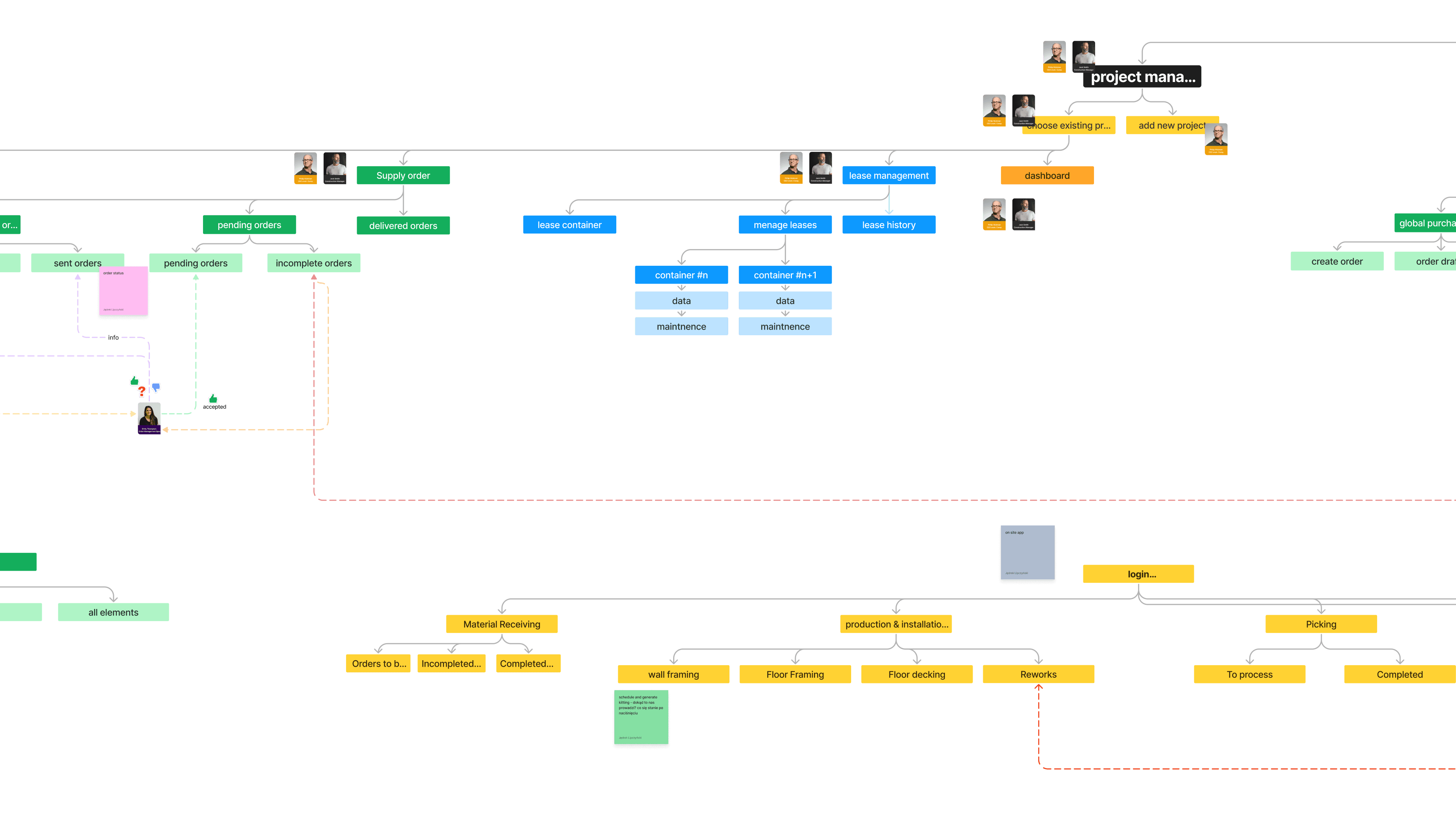
Given the scale and complexity of the platform, establishing a clear information structure was critical.
I designed the information architecture to reflect real-world processes — from material procurement and scheduling, through production and QA, to installation tracking. The focus was on reducing cognitive load, clarifying ownership of actions, and making complex system states understandable at a glance.
Lo-Fi Prototyping & Flow Design
Early concepts were explored through low-fidelity wireframes and flow diagrams, allowing for fast iteration and alignment across teams.
At this stage, the focus was on validating user flows, permissions, dependencies between modules, and system logic — before investing time in visual detail.
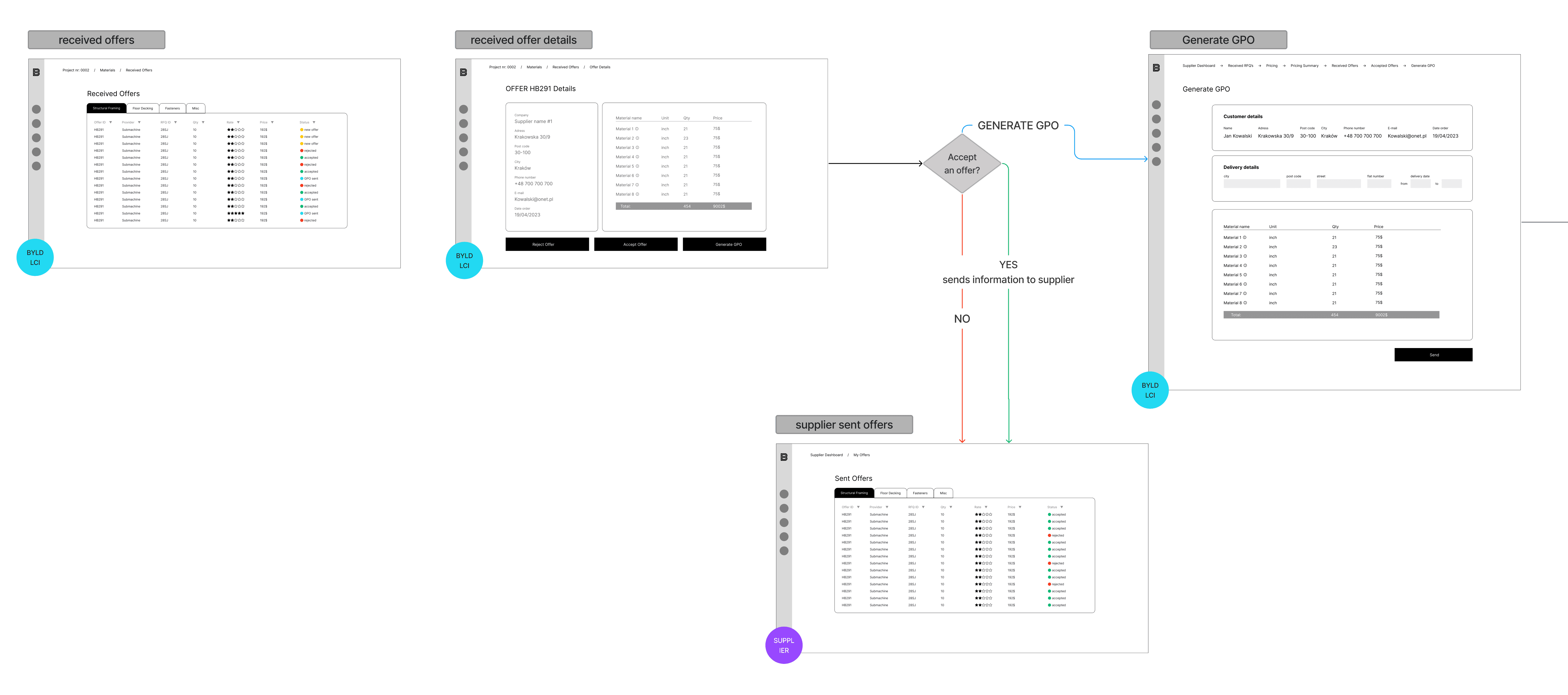
A fragment of the wireflow illustrating how supplier offers are received, reviewed, accepted or rejected, and then converted into a GPO within the platform.
Hi-Fi Interactive Prototyping
Once core flows were validated, I moved into high-fidelity, interactive prototypes. These were used to:
simulate real user scenarios,
test interactions and system feedback,
support technical discussions with developers,
and align stakeholders around concrete solutions.
Hi-fi prototypes also served as a bridge between design and implementation, significantly reducing ambiguity during development.
Project dashboard
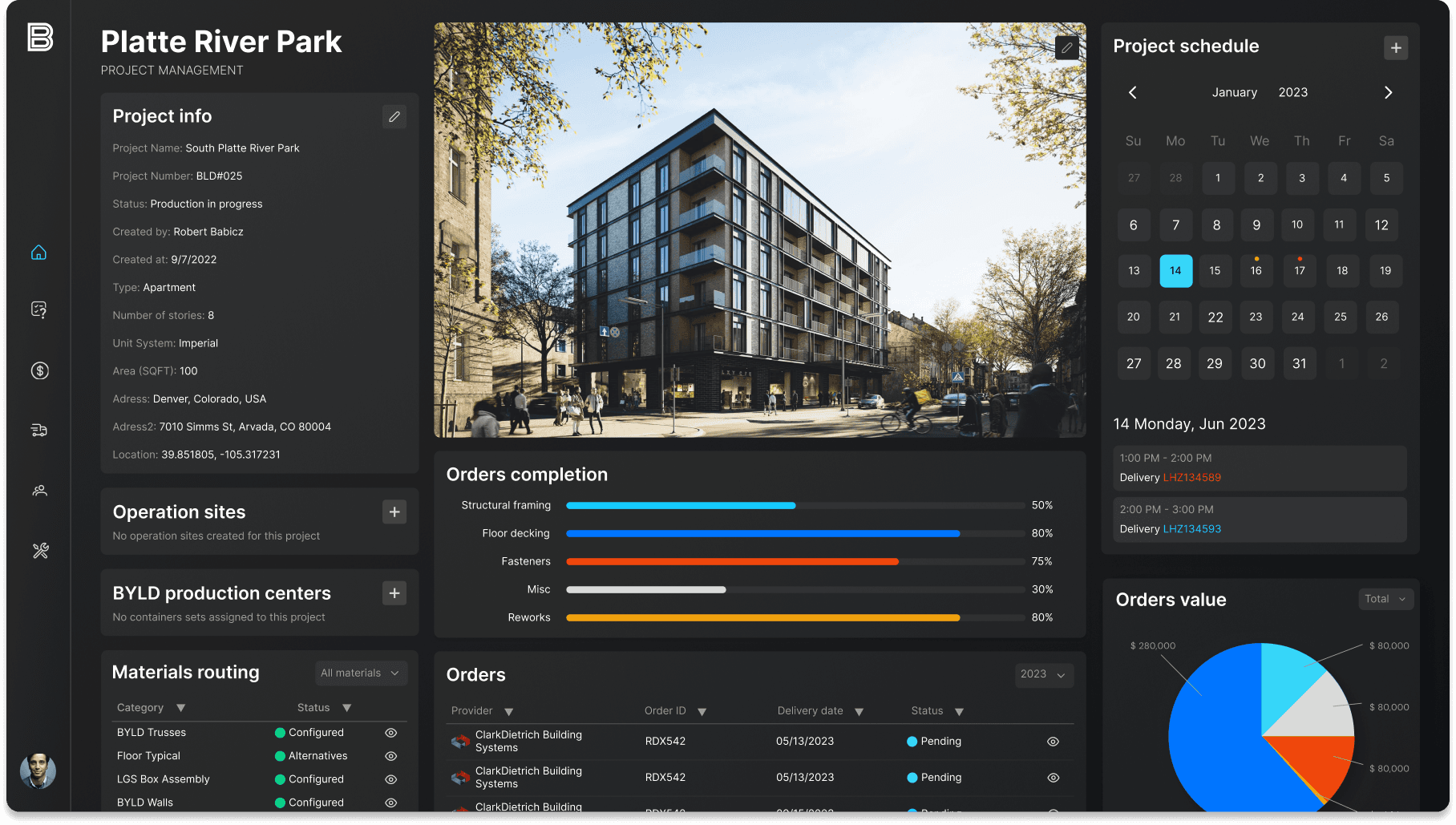
This dashboard provides a single, consolidated view of a construction project, combining strategic context with real-time operational data. Designed as a decision cockpit, it reduces complexity, highlights what matters most in the moment, and enables stakeholders to quickly assess progress, risks, and next steps without leaving a single screen.
Guided material ordering
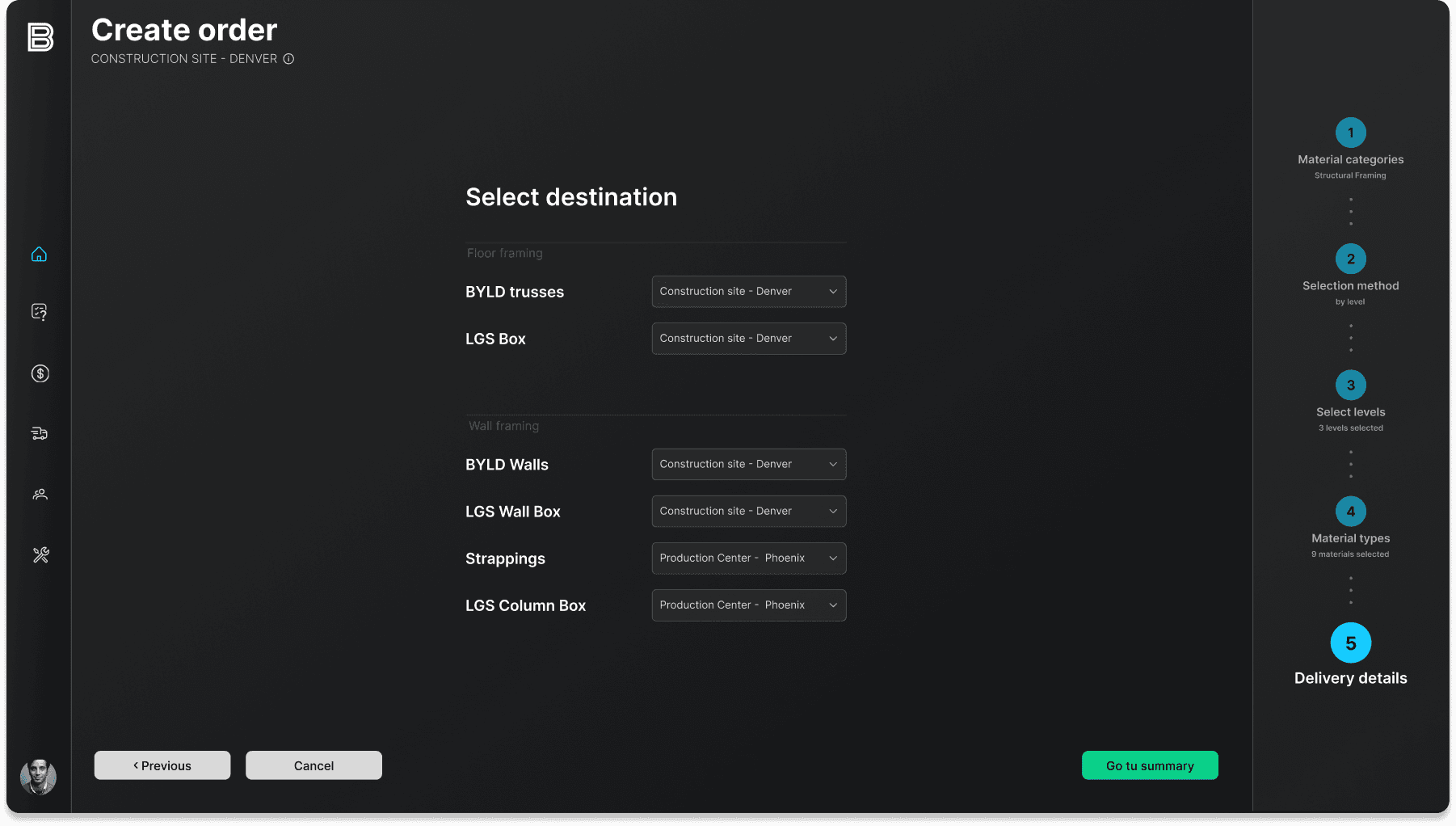
This screen is part of a multi-step ordering wizard designed to handle the inherent complexity of material procurement without overwhelming the user. By breaking the process into clear, sequential steps, the interface supports informed decision-making, reduces errors, and ensures that destinations, material types, and delivery details are defined with confidence before an order is finalised.
Pending Orders — Order Status & Validation
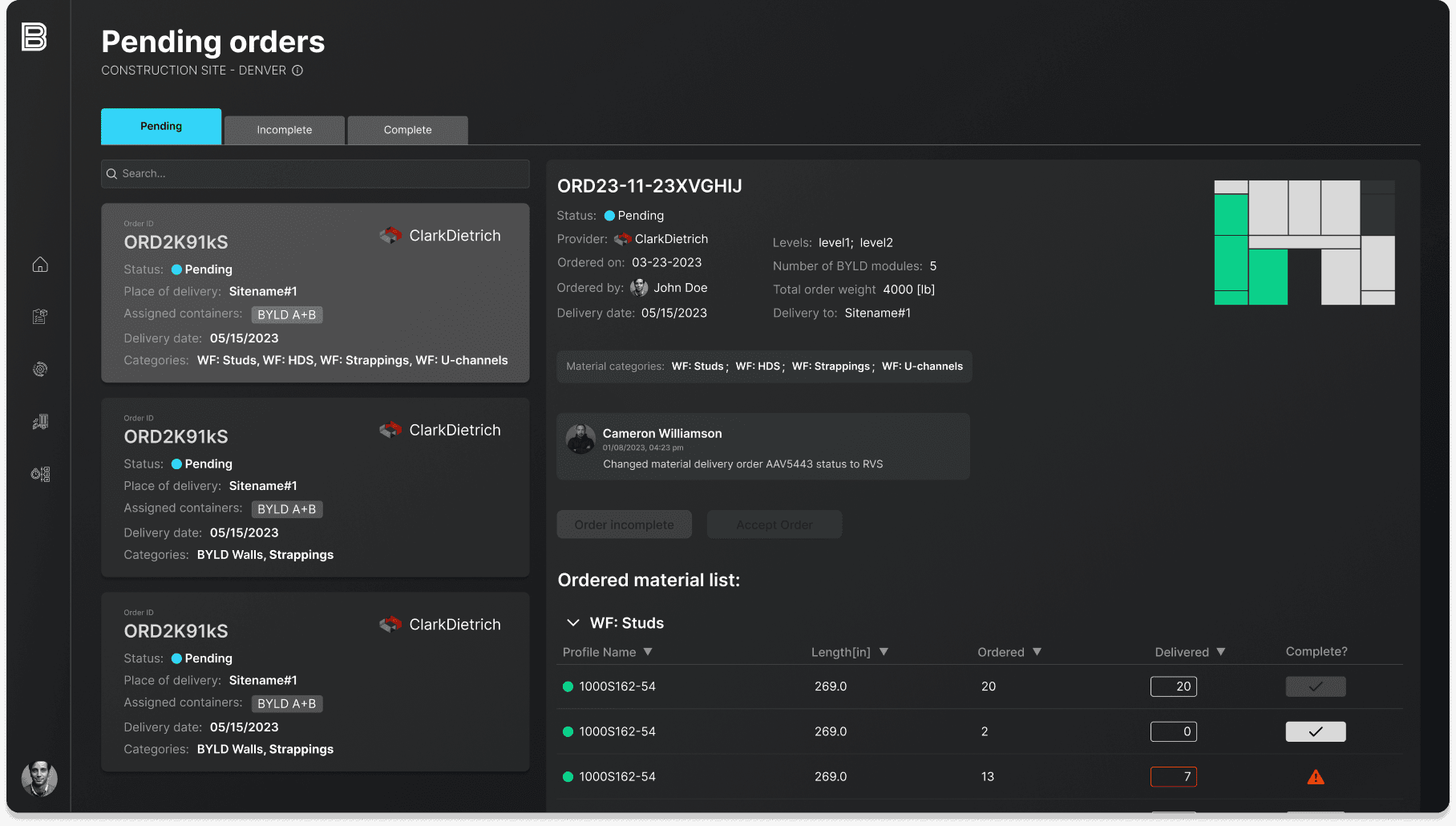
A detailed overview of all pending and incomplete orders, allowing teams to validate deliveries, resolve discrepancies, and track supplier progress. This screen acts as a control point before materials enter production or installation workflows.
Inventory — Real-Time Material Visibility
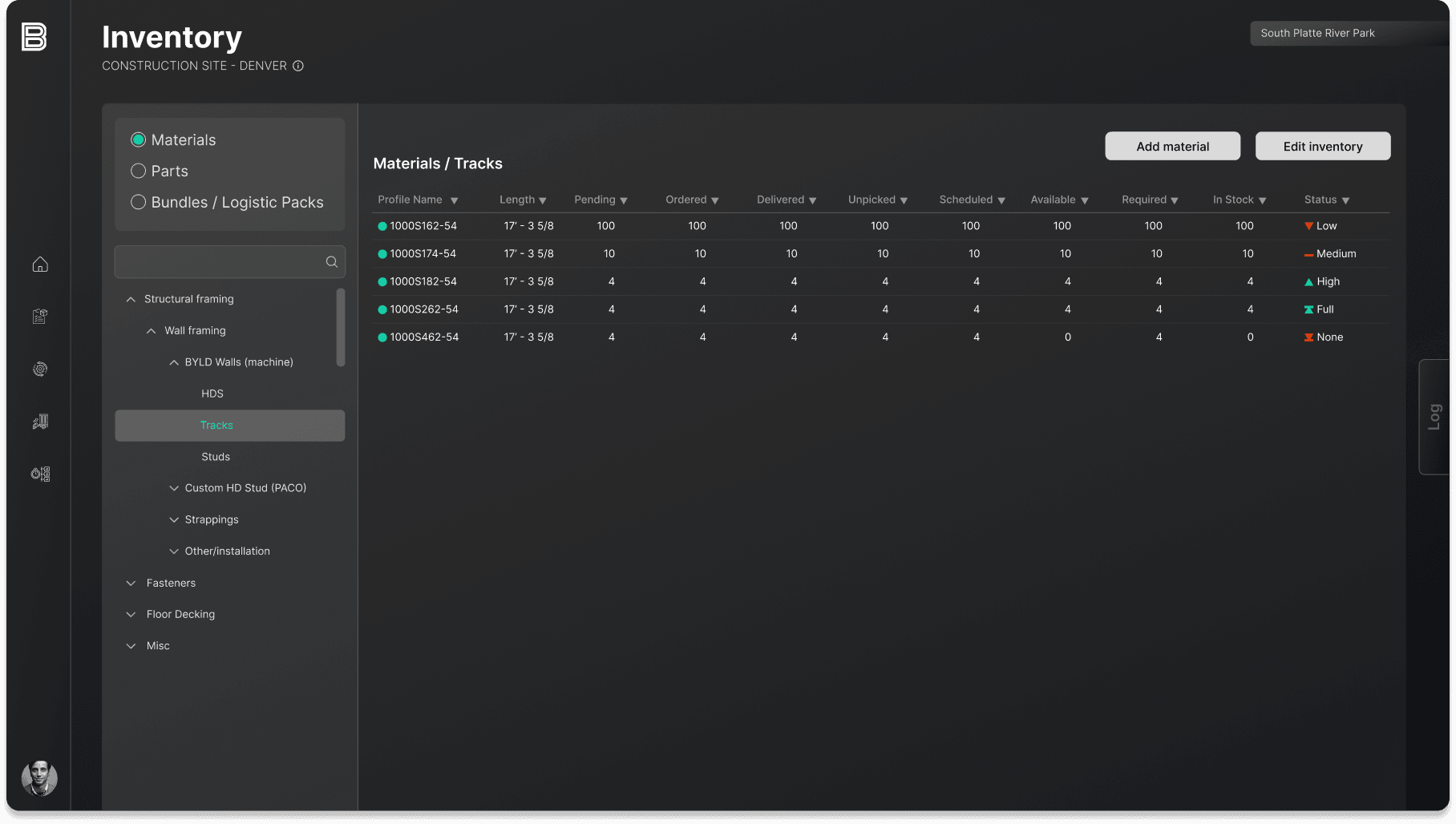
A centralized inventory view providing real-time insight into material status across the project. It enables teams to track availability, shortages, and upcoming demand, supporting informed planning and proactive decision-making.
Production Planning
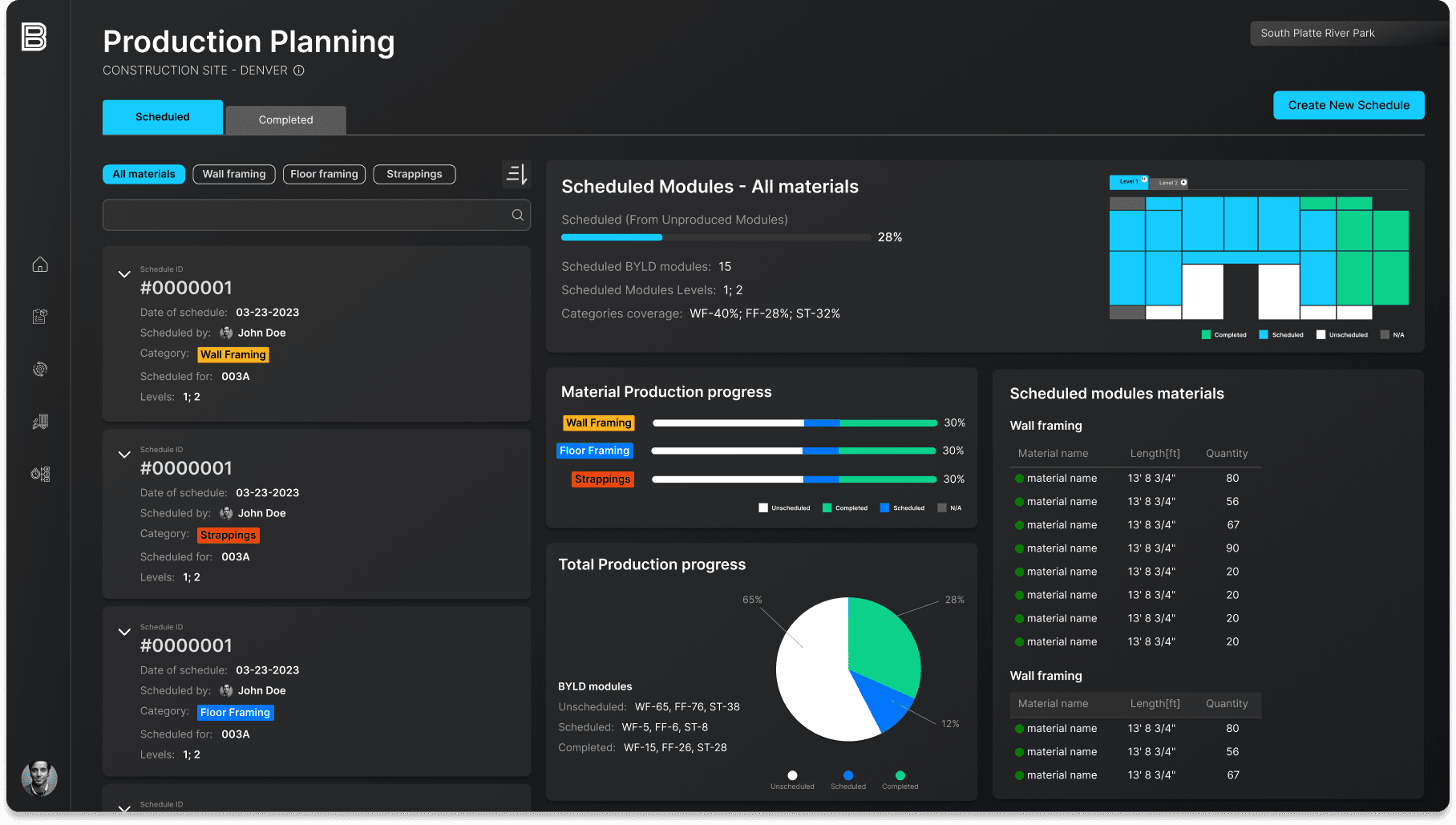
A planning and monitoring view that connects schedules, materials, and production progress into one coherent overview. It allows teams to balance workloads, track completion, and quickly identify bottlenecks across different framing categories.
Picking — Production Preparation
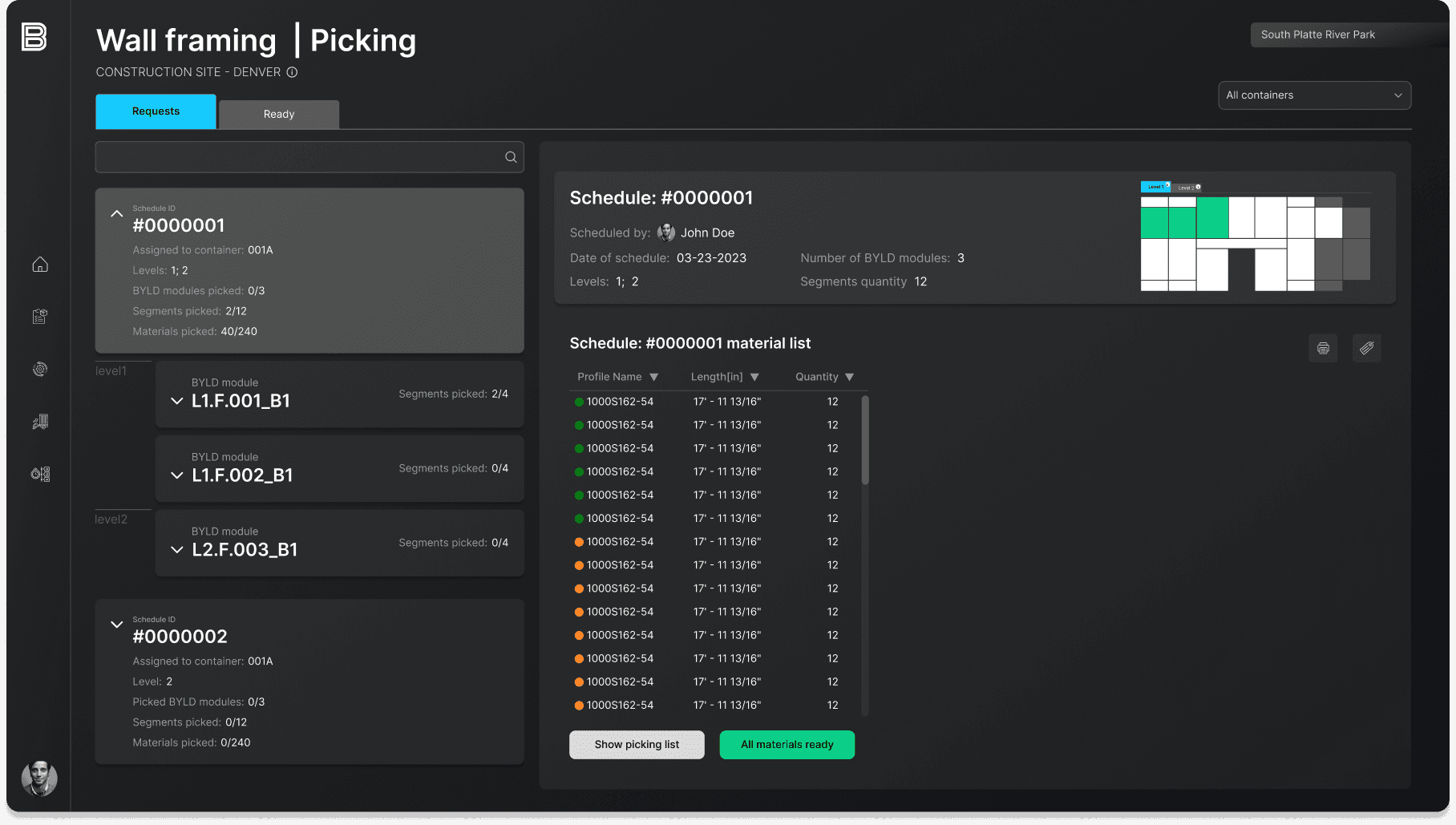
A picking interface that translates schedules into actionable material sets. It helps warehouse and site teams prepare exactly what’s needed for production, minimizing errors and ensuring smooth handoffs to the next operational stage.
Quality Assurance
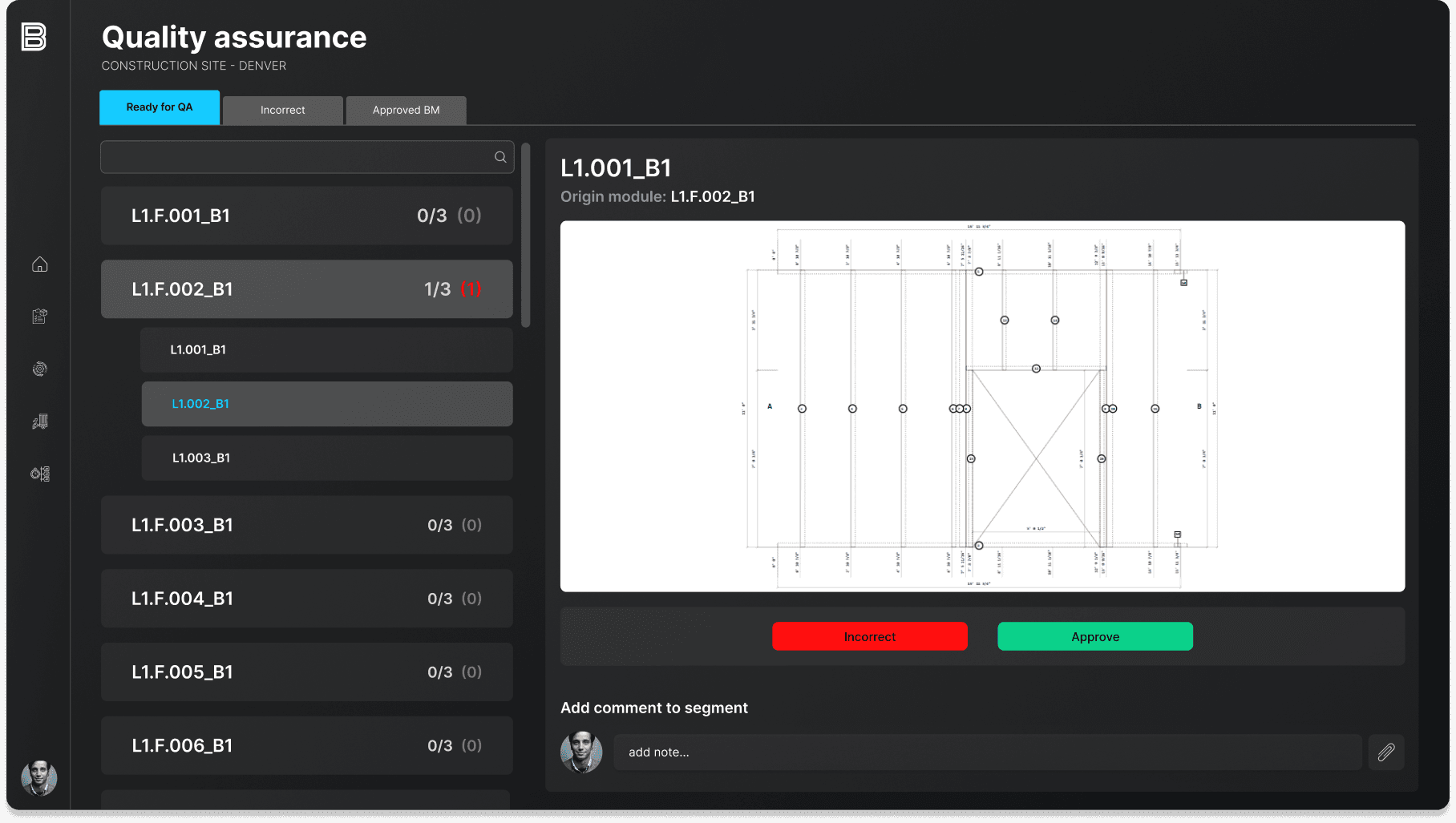
A QA module designed for precise, segment verification against technical documentation. It supports clear approval and rejection flows, contextual feedback, and traceability across production stages to maintain high quality standards.
Outcome
The resulting platform provides teams with a shared operational view of LGS construction projects, enabling them to:
plan and purchase materials with confidence,
coordinate deliveries and production schedules more effectively,
maintain accurate, real-time inventory visibility,
enforce consistent QA processes,
track production and installation progress end to end.
Rather than acting as a set of disconnected tools, the platform functions as a cohesive operational system, supporting informed decision-making across the entire construction lifecycle.